Showing posts with label cuttable. Show all posts

Friday, January 11, 2013

A Scotty for your Snotty Tissue Box

Materials:
Great Scott Paper Pack
Great Scott, It's Cold Cut It
Tissue Box Cut It 
Card stock
tissue
glue

Directions:
Begin by printing out the striped paper from the Great Scott Paper Pack. Then place on cutting mat and cut out your tissue box. Fold up all the edges as shown.


Start by folding in the back end, gluing the tabs to the sides of the box and the wrap the top around and glue down. Fold the front end (the one with the circle in the middle) and glue down the tab as shown.


The box part is done, just add a basic travel pack of tissues. I did remove the plastic wrapping first. Then fold up the end (don't glue).

Now cut out a strip of coordinating paper that is 1 1/2 inches wide and 8 1/2 inches long. Cut a 2nd strip that is 1 inch wide and 8 1/2 inches long and glue together. Cut out the first dog from the Great Scott, It's Cold Cut It Set and assemble. I think just printed off a small tag reading "A Scotty for your Snotty" using LD Hipster Child and LD This and That. Wrap the strip of paper around the center of the box, and adhere your Scotty and tag!

Thursday, December 27, 2012

Thursday's Tip: New Years Favors


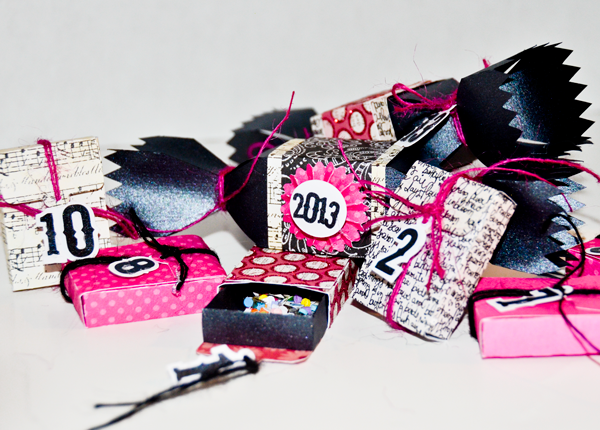
Looking for the perfect party favors this New Years?  These candy poppers and matchbox confetti favors are cute, fun and sure to be a hit! Learn how to easily put these fantabulous favors together and how to cut fonts using Make-The-Cut and your digital cutting machine.

Materials:
Cracker Favor Box Cut It Set
Simple Match Box Cut It Set
LD Petticoat Twist
Accordian Fold Rosettes
Cardstock
confetti
candy

Candy Popper Directions:
Begin by cutting out and assembling your cracker favor boxes. Then embellish with strips of coordinating paper. For extra fun embellishments, cut out some Accordian Fold Rosettes and assemble, then add a circle with the year on top, or create year ties for the ends by following the directions below, on how to cut out fonts using Make-The-Cut.


Be sure to add some yummy treats!


Match Box Confetti Count Down Favor Directions:
Cut out and assemble your Simple Match boxes. I chose top 2 (or image 3), that had the hole cut into it. I sized these down so that when assembled they would be about 2 inches long. To make the fun, font numbers begin by opening Make-the-Cut and click on the text and fonts tab. I used LD Petticoat Twist  for my font. You can use this, or choose another bold font.


Click on the Add text group and type in your numbers and be sure to select "Split by Glyphs." Click accept. The numbers will now be on your mat already split apart. We are now going to merge our "10" by selecting the two numbers, right click and select shape magic>weld.


Now go ahead and spread the numbers apart more. We are going to create the shadow layer for the background of the numbers. Make sure all your numbers are selected and then right click>shape magic>shadow layer. Then adjust the thickness to however you like, but make it thick enough that it can be a solid tag base.


Now turn off the top font layer by selecting the eyeball on the layers menu. And we are going to black out the bottom shadow layer so there are no spaces to cut by right clicking>shape magic>blackout. It should now look like this.


To create a tag circle for it to hang, begin by creating a circle. Do this by clicking on the shape icon at the top left. It's under generic.


Now create a second circle by copying the first (control+c) and pasting (control+shift+v). Now size it down a bit. This will be the center that we will cut out.


Center the smaller circle above the larger and right click>shape magic>boolean join.


Now place above the first number where you want to join it. Copy and paste the circle and place above each number thereafter. Select all the circles and the numbers, right click>shape magic>weld.


Cut out both layers of numbers, assemble and tie to your match box, then fill with confetti!

Thursday, September 20, 2012

Thursday's Tip: Fall Garland

Bring the autumn indoors with this easy to make leaf garland. Using the Simple Leaves SVGs and the Fall Forget Me Nots Paper Pack, simply print out your Fall Forget Me Not paper onto cardstock and then use it to cut out the leaves. String up and enjoy the warm fun decor anywhere in the home!

Thursday, August 30, 2012

Doing More with Simple Shapes: Gift Wrap Set

Our brand new Simple Shapes Super Bundle Plus is still available for just $49 until August 31st at midnight, MST. With over 800 images its less than 17 cents an image! This bundle boasts 50 new sets including this amazing Gift Wrap Set. Everything you need to wrap the perfect little gift! Just in case you weren't sure how to use it, follow the directions below to see how amazingly fun and simple it is!

Materials: 
Simple Gift Wrap Cut It
Card stock
Glue
Twine

Directions:

Begin by cutting out your boxes and bows using coordinating cardstock. Fold the box on the score lines and bring up together. The top and bottom fold similarly, however the top has an addition flap for extra support as shown:

This set has two bow styles. A typical "tied" bow, and then two styles of floral like bows. To make the paper tied bow, cut out and fold up together, linking the two cut lines as shown:
Once the bow is pressed together, wrap the small strip around the center and glue.

To make the flower bow, simply cut out and insert a brad into one petal, and continue around bringing up each petal and inserting it into the brad. When all the petals are inserted, poke brad through the center of the bow and bend the legs so that it stays. There is an optional additional size for each style, if you want to make a double layer.

Lastly combine all the elements to make a package quite possibly prettier than the gift ;)


Friday, August 24, 2012

Simple Shapes Super PLUS Bundle is here!

The Original Simple Shapes Super Bundle has been our all time BEST SELLER and you've begged for more! 

Introducing the Simple Shapes Super PLUS Bundle! This bundle boasts 50 new sets bundled together for only $49! This EXCEPTIONAL savings will only be available until August 31st so take advantage of it now! That is less than $1 for each set! 

BONUS! The Simple Shapes Super PLUS product has a bonus layer! Some cutting machines allow you to change out your blade for an embossing tool or writing tool. The bonus "plus" layers allows you to embellish your files prior to cutting. Don't worry if you don't want the extra work. You can ignore that layer. That is why it's a bonus layer. 

 Ready to save even more? Use coupon code: KISSme for a savings of 50% when you spend $98. Take advantage of this super savings when you buy both bundles and it's like you get one for free!

Thursday, August 23, 2012

Thursday's Tip: Wedding Photo Booth Photo Props

His and hers eyeglass photo props?! I do, I definitely do! Making your own darling wedding photo booth photo props couldn't be easier. And wouldn't this make for the most fun wedding photos?!

Materials:

Spectator Specs SVGs
LD Buttercream
Cardstock
wooden dowels

Directions: 

Before you begin, make sure you have LD Buttercream installed on your computer. Open up Make-the-Cut and open the Spectator Specs SVG's you desire to use. We used 04 for the Mr. and 06 for the Mrs. Now using the text and fonts feature in Make-the-Cut to the right of the virtual mat, click on the text fonts tab under the virtual mat tab. Select LD Buttercream in your fonts, and click the text button underneath so that a text box will pop up and you can write in "Mr."


Go ahead and pull on the corner until Mr. is the size you want. Then you will right mouse click>shape magic>split. Now Mr. will be broken up into 3 separate pieces. Adjust the pieces so that they are all touching.


Once everything is positioned where you want, select everything then, right mouse click>shape magic>weld. Now everything should be joined together and ready to cut!

Tuesday, August 14, 2012

$2 Tuesday Back to School Special!

We've got an amazing $2 Tuesday Back to School Special. Head on over to LD and get $2 Cut It's and $2 Bundles on some of our favorite school related items like Go Team Lockers, Toad-ally School, Pop School and more! 

Offer ends next Monday, August 20th at midnight, MST.

Thursday, July 12, 2012

Patriotic Cracker Favors by My Thoughts Exactly

I spotted these amazing Patriotic Cracker Favors by Alyssa at My Thoughts Exactly. Check out her post for more pics and to see what products she used! So cute!!!

Friday, July 6, 2012

Friday Freebie: Fun Cracker Favor Box!

Head on over to LD and grab your FREE 2 Piece Cracker Favor Box! This cuttable project is the perfect wrap for a small little sentiment! Offer ends Sunday at midnight, MST.

Be sure to stay tuned because we will have many more FREEBIES to come during our Holiday Hop! Check out our Christmas in July Sale now!


Monday, June 11, 2012

Manic Monday Freebie!


We are getting ready to release a new simple shape set, but this group has a plus. That plus is an option layer that you can use for embossing, or drawing if your cutting machine has the capabilities of trading out a blade for a pen or embossing tool. The optional layer would look great embossed or with paint or glitter pens, depending on the file. Grab this freebie, test it out and let us know what you think! Get your FREEBIE here!

Thursday, May 24, 2012

Thursday's Tip: Monster Clips and Teacher Gifts

The school year is coming to an end. Have you thought about how to show your appreciation to those impressive educators in your life?  When I asked my son what he wanted to get his teacher, he thought really hard then said, "How about a box of marshmallows?" Then I said, "Well she might not like marshmallows as much as you, but we can get her a box of something." So we set to work.

Materials:
Animal Boxes and Bags SVGs 
Monster-licious Cupcake Toppers or other LD graphics
Card stock
Brads
Twine
Paper Clips
Sewology Cover Buttons
Candy or other various items to put in your boxes

Monster Clips:
They don't actually doesn't have to be monsters, there is a lot of cute graphics you could use as well, I just love these images, and felt it best represented my son. I began by downloading and opening up each of the Monster-licious Cupcake Toppers in Photoshop or like program. I got the 3/4" sized buttons, so I sized down the toppers to 3/4" so that I know that the whole of the image would show on the button top. I then created a 75 pixel stroke around each circle so that I have enough color to wrap around the edge of the button.
To stroke each layer, double click on the layer you want to stroke in the layer menu. When the layer style box pops up, click on stroke on the bottom left hand side. You will see the options in the middle change, now adjust the size to about 75 pixels. Then go down to the bottom center of the layer style menu and click on the color swatch box. A color box will pop open and you will automatically get a little dropper tool that will enable you to select a color from the image you are working on. I went ahead and selected the base color of each topper to extend each one.

Once each layer is stroked, go ahead and print the sheet then cut out the images. The nice thing about using these cover buttons is that they don't have to be cut out perfectly. In fact I just cut each image into a square. To ensure I got the button where I wanted it, I made an impression of the button around the edge of the image. Like this:
Then you place your image face side down and the button on the back and insert it into the button shield mold. Hold securely and tuck the edges of the paper around the back of the button. Position the back of the button and use the pusher to press down until you hear it snap into place.
Then use a hot glue gun to glue the paper clip to the back of the button.


Multi-Gift Box:

Begin by cutting out four of the boxes from the Animal Boxes and Bags SVGs. I first sized them down so that they would be about 2 inches square each. Assemble each box:
 Once you have all four assembled, then use your hot glue gun to glue them all together.
I made fasterners on each of the boxes by using a small paper punch to punch holes through the top of the lid and attached my twine, making a loose loop, then inserted a brad into the bottom half of the box.
Then go ahead and fill your box, with goodies, teacher supplies or whatever else you can think of. Add a little tag, and you have a fun little and unique gift!


Thursday, May 17, 2012

Flower Wreath by I Love 2 Cut Paper

I'm so in love with this wreath done by Joanna at I Love 2 Cut Paper using Sheri's Cut Flower Bundle. Check out the details and how to on her blog. You won't be disappointed!

Thursday, October 13, 2011

Thursday's Tip with Jin Yong: MTC Tiler Tool and Pin the Nose on the Monster!

Under the Cherry Tree's Jin Yong, came up with this brilliant kiddie game using our Monster Lights Cut It Set (on sale now) and was able to teach us a thing or two about Make-The-Cut in the process!

Check out Jin's amazing tip here!

Also, did you get a chance to see our Wild Wednesday's deals? One day left to catch the amazing savings...including a freebie!

Thursday, October 6, 2011

Thursday's Tip: Meet Mr. and Mrs. Bones

Say hello to Mr. and Mrs. Bones...These fun skeleton portraits make for some great spooky decor! We got this fabulous idea from Peppermint Plum With some slight alterations in materials, we found a fast, easy and fun decor idea!

Materials:

Black Cardstock
Gold acrylic paint
2 frames

Directions:

Cut out two skeletons from the Halloween Cut It Sets onto black cardstock. Then cut out two background images from your favorite scrapbook paper to fit the shape of the inside of your frame. Although, the picture doesn't do it justice, I antiqued the paper and the skull a bit with some gold acrylic paint. Just by lightly brushing it on here and there. Once they were done and dried, I glued a head to each background and added the ribbon bow to each one. I placed my skulls into each frame and Mr. and Mrs. Bones were born!

Make this fun tutorial for a great deal with the Halloween Cut It Set, on sale for just $2 now!

Tuesday, October 4, 2011

Two for Tuesday: Hey there Delilah!


Need a little fancy finishing touch for any of your projects, or the perfect adornment to any gift? This fancy Two for Tuesday bundle is just what you need to give that perfect ornate touch. Hurry and nab these two SVG's for one low price of just $4! Offer ends Monday, October 10th at midnight MST.

Thursday, September 29, 2011

Thursday's Tip: Stand Up Christmas Tree Garland


Using the Festival of Trees SVG from the A Christmas Carol SVG Bundle and a little help from Make-The-Cut, this Christmas Garland makes for some super fun decor!


Tip:
Did you know you can weld two or more objects together in Make-The-Cut?


Bring in your objects to MTC. Making sure that each object is selected that you want to weld together simply click the weld button at the bottom.

You can also easily create a shadow layer (the green background layer) in Make-The-Cut. First you need to blackout the cut out spaces by hitting CNTRL+R. So that it looks like this:


After that is done, hit CNTRL+H to create your shadow. You'll want to play with the thinkness and the corner join. Select accept when you've got the look you want. 


Super easy and super fun! And better yet, to help you get started on all your Christmas decor we've got a killer sale on our A Christmas Carol SVG Bundle and Joyeux Noel Collection! Get the SVG bundle for just $15 and the Joyeux Noel Collection for just $5. Offer ends next Wednesday, October 5th at midnight MST.


And don't forget, just 4 days left for out Dog Days of Summer sale!